Ultimate Guide to Downloading TikTok Videos No Watermark via TikMate
In today’s fast-paced digital world, TikTok serves as a global stage for short-form creativity with billions of clips shared daily. While viral content is everywhere, many users still find it difficult to preserve their favorite videos for offline viewing without being hampered by the distracting official logo or watermark.
To bridge this gap, TikMate.to delivers a premium solution to download TikTok videos, photos, and high-fidelity MP3s effortlessly. Our web-based tool requires zero software installations or accounts. You simply copy and paste the TikTok link to access your content instantly. Discover the power of our high-speed downloader today!
Why is TikMate the premier choice for downloading TikToks?
TikMate stands out from other services by offering a more refined, ad-light, and ultra-fast experience. We focus on delivering exactly what you need through these premium advantages:
- ✅ Pristine content quality. Every video and photo downloaded via TikMate is guaranteed to be 100% free of watermarks or user IDs, making them perfect for your creative projects.
- ✅ Maximized resolution up to 4K. Save videos in the best available quality. Unlike other sites, we don't force you to watch ads just to unlock HD downloads.
- ✅ Lightning-fast speed. Our global CDN infrastructure ensures that whether you are in Asia, Europe, or America, your downloads start instantly and finish in seconds.
- ✅ We value your personal data. TikMate does not store information or track your download history. Our tool is secure, transparent, and completely free for everyone.
Follow these simple steps to save TikTok content via TikMate:
Step 1: Copy the TikTok video link
Step 2: Visit the TikMate website
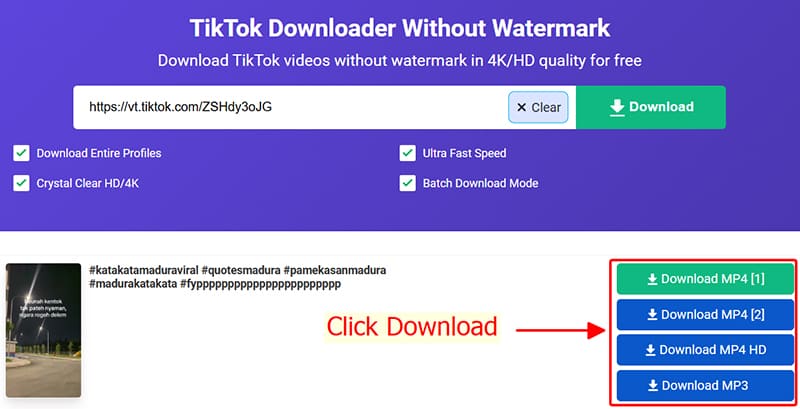
Step 3: Extract the content
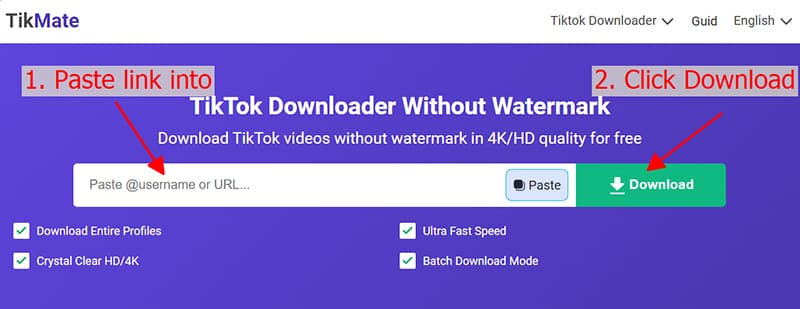
Step 4: Choose format and save
Pro tips for a better experience with TikMate
- TikMate is designed to work perfectly across all platforms, providing a smooth downloading process on PC, Android, iOS, Windows, and macOS.
Special instructions for Apple users (iPhone/iPad):
- Finding your files: Downloads are usually saved in your browser's default Downloads folder. You can also quickly find them in your browser's history or file manager.
Copyright Policy and Privacy
We recommend using downloaded content for personal entertainment and educational purposes only. Please respect the intellectual property and privacy of all creators. If you intend to share or use content for public or commercial use, you should always obtain permission from the original owner to avoid copyright issues.
TikMate: A Security-First Solution for TikTok Fans
TikMate.to was created by a dedicated global community of developers who share a passion for TikTok. We are committed to providing a secure and transparent service that prioritizes user safety. We guarantee that our downloader remains completely anonymous and never collects your personal data. We truly appreciate your trust and support!