Ultimate Guide to Downloading TikTok Videos No Watermark via TikTok Downloader
In the era of viral short-form content, TikTok has become a global hub for creativity with billions of clips shared every day. However, users often face difficulties when trying to save their favorite videos for offline viewing or creative repurposing without the distracting app logo.
To solve this, TikMate.to offers a seamless way to save TikTok content, including videos, photos, and high-quality MP3s. This tool works online, requiring no registration or software installation. Just copy the TikTok link, paste it into the search box, and enjoy your content instantly. Experience our amazing TikTok downloader now!
Why is TikTok Downloader the best choice for you?
While there are numerous services like SnapTik or SSSTik available, TikTok Downloader stands out by offering a more refined, ad-light, and ultra-fast experience. We focus on delivering exactly what you need with these premium advantages:
- Pristine content quality: Every video and photo downloaded is guaranteed to be 100% free of watermarks or user IDs, making it perfect for your creative projects.
- Maximized resolution (HD/4K): Save videos in the highest available resolution. Unlike other platforms, we don't force you to watch intrusive ads to unlock premium quality.
- Lightning-fast downloads: Our global CDN infrastructure ensures that whether you are in Asia, Europe, or America, your downloads start instantly and finish in seconds.
- Uncompromising privacy: We respect your data. TikTok Downloader does not store personal information or track your download history. Our tool is secure, transparent, and always free to use.
Detailed steps to download TikTok content via TikTok Downloader:
Step 1: Get the TikTok URL
Step 2: Access the TikTok Downloader
Step 3: Retrieve TikTok data
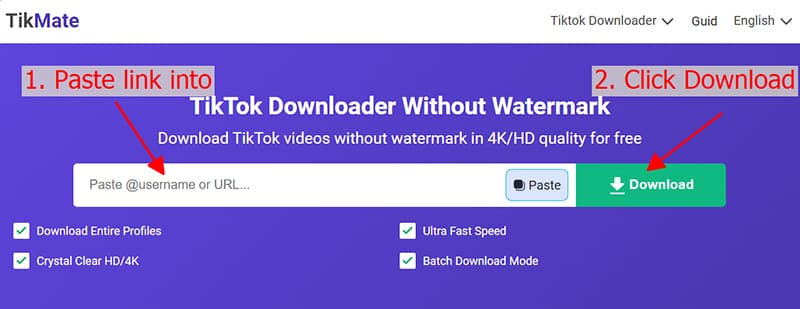
Step 4: Configure format & quality
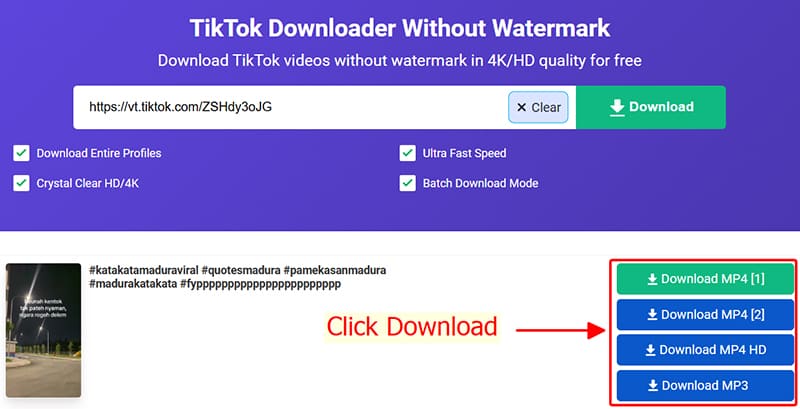
Important tips for using TikTok Downloader
- Our platform is fully compatible across all environments, ensuring a smooth experience on PC, Android, iOS, Windows, and macOS.
Guide for Apple devices (iPhone/iPad):
- Where is the file? Your downloads are automatically moved to the browser's Downloads folder. You can always find your videos in the download history manager.
Copyright Policy and User Privacy
We encourage using downloaded content for personal entertainment and learning only. Please respect the intellectual property and privacy of creators. If you plan to share or use the content for public or commercial purposes, always seek permission from the original owner to prevent copyright complications.
TikTok Downloader – Your Premier Security-First Tool
TikMate.to was built by a global community of developers who love TikTok. To maintain transparency and trust, our source code is entirely open-source on GitHub, allowing anyone to verify our safety protocols. We guarantee that our downloader remains anonymous and never collects personal user data. We appreciate your support!